How to Tailor Your Resume to a Job in 90 Minutes
Learn how to tailor your resume to job listings in just 90 minutes, with ATS-focused edits, examples, a checklist, and Resumefy tools.

To get more interviews, tailor your resume to the job by mirroring its title, embedding some of its top keywords in your summary, and rewriting your first two or three bullets to reflect its core responsibilities. That single round of edits takes 30–90 minutes and addresses the two biggest filters standing between your resume and an interview: the ATS that screens it first and the recruiter who scans it for just 6–10 seconds before deciding whether to read further.
The three places to edit right now:
- Resume headline/title: Match the job's exact title or its closest honest equivalent.
- Professional summary and top 3 bullets: Use the job description's language, not yours.
- Skills section: Add every required skill listed in the posting that you genuinely have.
That's the minimum viable tailoring pass. The rest of this guide shows you how to do it well.
***
Table of Contents
- How to tailor your resume to a specific job description
- Does your resume actually pass the ATS filter?
- Before-and-after bullet examples you can copy and adapt
- Small text that makes a big difference: headlines, titles, and skills
- Practical tips for submitting a tailored resume
- Your tailoring checklist with a time budget
- Why the 6–10 second scan stat actually matters for your resume
- Key Takeaways
- The habit that actually saves time when tailoring
- Resumefy makes the tailoring process faster and lower risk
- Useful sources and tools for further reading
How to tailor your resume to a specific job description
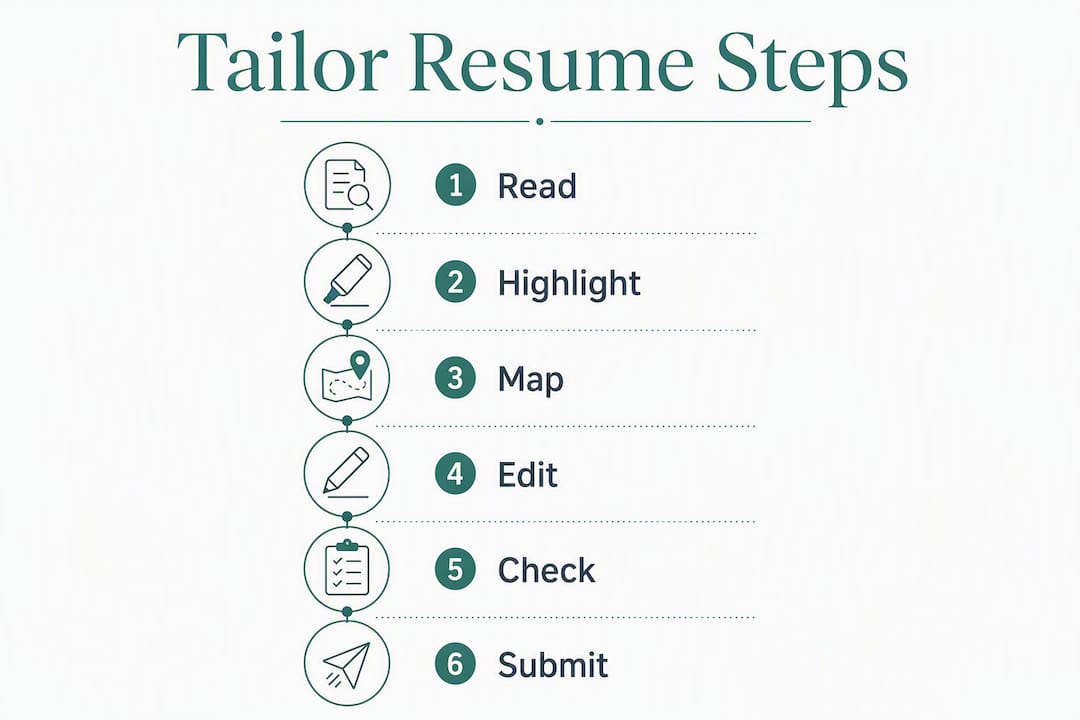
Tailoring is a workflow, not a one-time tweak. Run through these steps in order and you'll finish with a resume that reads like it was written for this job.

Step 1: Dissect the job description
Read the posting twice. On the first pass, highlight every phrase that appears more than once. Repeated language signals what the employer actually cares about, not just what they listed out of habit. On the second pass, separate required skills from preferred ones. Required skills are non-negotiable for ATS; preferred skills are tiebreakers for shortlisted candidates, so add them to your skills section even when they're listed as optional.
Note the job title the employer uses. That exact string often appears in ATS keyword filters.
Step 2: Map their language to your experience
Pull up your current resume and your notes from Step 1 side by side. For each highlighted phrase, find the experience on your resume that best matches it. Then decide: surface it, compress it, or cut it.
- Surface: Move the most relevant role or achievement to the top of its section, or expand its bullet count from one to three.
- Compress: Shrink roles that are real but not relevant to one line or remove their bullets entirely.
- Cut: Drop roles older than 10–15 years that add no relevant signal for this posting.
Reorder sections too. If the job is technical and your certifications are buried at the bottom, move them above your work history.
Step 3: Edit each resume zone
Headline/title: Change it to match the posting's job title, or the closest accurate variant. If your current title is "Marketing Coordinator" and the posting says "Marketing Specialist," use "Marketing Specialist" if that genuinely reflects your level.

Professional summary: Rewrite the first two sentences to include the job title and two or three of the posting's priority phrases. Keep it to three or four sentences total.
Experience bullets: Rewrite the first two to four bullets for your most relevant role. Lead with a verb the posting uses ("coordinated," "analyzed," "managed") and quantify the result wherever you can.
Skills section: Add every required skill from the posting that you have. Use the exact phrasing from the JD, not a synonym. "Google Analytics" beats "web analytics tools" every time in an ATS.
Certifications: If the posting names a certification you hold, list it with the exact credential string. Licensed professionals should mirror the regional label precisely, since screeners and ATS filters can misclassify non-standard strings.
Dos and don'ts
Do mirror the employer's language. Don't fabricate duties you didn't perform. Do compress or omit older, irrelevant roles. Don't keyword-stuff by pasting the job description verbatim into a white-font hidden section. That practice is detectable and disqualifying.
Pro Tip: *If your most relevant job isn't your most recent one, add a "Relevant Experience" subsection above your standard chronological history. List two or three achievements from that role there, then keep the full chronology below under "Additional Experience." This structure lets the hiring manager see your fit immediately without hiding your work history.*
***
Does your resume actually pass the ATS filter?
Most large employers use an applicant tracking system to score resumes before a human sees them. The system parses your text, matches it against the job description, and ranks candidates. Here's what that means for how you format and phrase your resume.
What ATS reads vs. what a recruiter skims
| Element | What ATS prioritizes | What a recruiter prioritizes |
|---|---|---|
| Keywords | Exact phrase matches from the JD | Relevant job titles and clear achievements |
| Section labels | Standard names: Summary, Experience, Education, Skills | Visual hierarchy and white space |
| File format | Clean .docx or PDF (text-based, not scanned) | Readability in 6–10 seconds |
| Formatting | Simple, single-column layouts | Bullet clarity and quantified results |
| Headers/footers | Often skipped or misread | Rarely noticed |
ATS formatting dos and don'ts
- Do use standard section headings: Summary, Work Experience, Education, Skills, Certifications.
- Do submit .docx unless the employer specifies PDF. When PDF is requested, export from a word processor, not a design tool.
- Do place your contact information in the body of the document, not in a header or footer, since many ATS parsers skip those zones.
- Don't use text boxes, columns, tables, or graphics to hold key content. ATS often reads these as blank.
- Don't use a fancy font for section labels. Arial, Calibri, and Georgia parse cleanly.
- Don't embed keywords in image alt text or hidden layers. Parsers ignore them and recruiters penalize the tactic.
Place your highest-priority keywords in three spots: the summary (first 50 words), the skills list, and the first bullet of each relevant role. That covers both the ATS scan and the recruiter's 6–10 second quick read.
***
Before-and-after bullet examples you can copy and adapt
Generic bullets describe what you did. Tailored bullets show a hiring manager that you did exactly what they need. Here's how the transformation works across four common functions.
Transformation table
| Original bullet | Tailored bullet | What changed |
|---|---|---|
| "Managed social media accounts." | "Managed Instagram and LinkedIn content calendars, growing combined following by 34% in six months." | Added platforms (JD named them), quantified growth |
| "Helped customers with issues." | "Resolved 40+ customer support tickets daily via Zendesk, maintaining a 97% satisfaction rating." | Mirrored "Zendesk" from JD, added volume and metric |
| "Coordinated team projects." | "Coordinated cross-functional sprints for a 6-person product team using Jira, delivering 3 releases on schedule." | Matched "cross-functional" and "Jira" from JD, added scope |
| "Increased sales." | "Exceeded quarterly sales quota by 18% through targeted outbound prospecting and pipeline management in Salesforce." | Added percentage, named tool from JD, specified method |
Copyable summary snippet
> Marketing Specialist with 4 years of experience in content strategy and social media management. Skilled in Instagram, LinkedIn, and Google Analytics. Delivered a 34% follower growth and a 22% increase in organic traffic for a B2B SaaS brand.
Copyable experience bullets (customer support role)
- Resolved 40+ daily support tickets via Zendesk, maintaining a 97% CSAT score across a 12-month period.
- Identified recurring product issues and escalated 15 bug reports to the engineering team, reducing repeat contacts by 20%.
- Trained 3 new support agents on internal workflows, cutting their ramp time from 4 weeks to 2.
The pattern in every example is the same: find the specific tool, method, or metric the job description mentions, then build your bullet around it. If you don't have a number yet, estimate conservatively or describe scope ("team of 6," "40+ tickets").
For career changers or early-career applicants, a Relevant Experience subsection lets you surface transferable achievements from internships, volunteer work, or adjacent roles without burying them under unrelated recent jobs.
***
Small text that makes a big difference: headlines, titles, and skills
The microcopy on your resume, the headline, the opening line of your summary, the skills list, does most of the work in the first 6–10 seconds. Getting it right is less about creativity and more about precision.
Job title and headline
Match the employer's job title when it's an honest representation of your level. If the posting says "Senior Project Manager" and you've been doing that work under the title "Project Lead," use "Senior Project Manager" in your headline with a parenthetical if needed: *Senior Project Manager (Project Lead, Acme Corp).*
A strong headline template: [Job Title] | [Top Skill] | [Industry or Specialization]
Example: Data Analyst | SQL & Python | Healthcare Analytics
Professional summary opening line
The first sentence of your summary is the single most-read line on your resume. Write it as a direct match to the posting:
If the job description uses "supply chain optimization" and "cross-functional leadership," those phrases belong in that first sentence, not buried in a bullet three roles down.
Skills section rules
List technical skills using the exact phrasing from the job posting. "Microsoft Excel" not "spreadsheet software." "Salesforce CRM" not "CRM platforms." Group related skills together: *Data Tools: SQL, Tableau, Google Sheets.* Represent proficiency honestly. Listing "Python (intermediate)" is fine. Listing "Python" when you can't write a loop is not.
One firm rule: never claim a certification or license you can't substantiate in an interview. A recruiter who asks about your listed PMP certification and gets a blank stare will end the conversation immediately.
***
Practical tips for submitting a tailored resume
Tailoring work is wasted if the wrong file lands in the recruiter's inbox. Three submission habits prevent that.
- Follow the employer's file format instructions exactly. If the posting says PDF, send PDF. If it says .docx, send .docx. Ignoring this signals you don't read instructions, which is the opposite of what a tailored application communicates.
- Name your file clearly. Use the format: `FirstName_LastName_JobTitle_CompanyName.pdf`. Example: `Jordan_Lee_MarketingSpecialist_Acme.pdf`. Recruiters often download dozens of files; a named file is easier to find and harder to lose.
- Track which version you sent. Keep a simple spreadsheet or use a tool like Resumefy's resume builder, which stores tailored versions tied to specific applications. Sending the wrong tailored file to the wrong employer is a real and avoidable mistake.
For email applications, the subject line should mirror the job title and posting reference number if one exists: *Application: Marketing Specialist — Req. #4821.* Paste the cover letter in the email body and attach the resume as a file.
***
Your tailoring checklist with a time budget
Use this before you hit submit. The full session runs 30–90 minutes depending on how much the role differs from your current resume.
| Step | Task | Time budget |
|---|---|---|
| 1 | Read the job description; highlight repeated phrases and required skills | 6–10 seconds |
| 2 | Edit the resume headline to match the job title | 2–3 min |
| 3 | Rewrite the professional summary (3–4 sentences, 2–3 JD keywords) | 10–15 min |
| 4 | Rewrite the top 2–4 bullets for your most relevant role | 10–20 min |
| — | Reorder sections so the most relevant content appears first | — min |
| 6 | Update the skills section with exact JD phrasing | 6–10 seconds |
| — | Proofread for consistency (tense, punctuation, formatting) | — min |
| — | Run an ATS check or [skills gap analysis](https://resumefy.ca/skills-gap) | 6–10 seconds |
When you're applying to many jobs quickly, focus on steps 2, 3, and 6 only. That 15-minute pass covers the highest-impact changes. When the role is a strong target, do all eight steps and invest the full 90 minutes.
***
Why the 6–10 second scan stat actually matters for your resume
Hiring managers typically scan resumes for about 6–10 seconds before deciding whether to read further. That's not a myth or a recruiter talking point. It's the practical reality of high-volume hiring, and it has a direct implication for where you put your best material.
Everything that matters most should appear in the top third of page one. That means your headline, your summary, and your first two or three bullets. If a hiring manager has to scroll to find evidence that you're qualified, most won't.
Tailoring is not only about keywords. It's about reordering and reframing your top evidence so a hiring manager sees immediate relevance within that first glance. A generic summary followed by a chronological list of duties fails that test even if the keywords are technically present. A tailored summary that opens with the job title and two specific accomplishments passes it.
Career centers and career-advice resources consistently point to the same practical conclusion: tailoring demonstrates fit and enthusiasm because it uses the employer's language and shows you prioritized their stated requirements. That signal matters to human readers as much as keyword density matters to ATS.
The practical application: after you finish editing, read only the top third of your resume. If you can't tell within 10 seconds what job you're applying for and why you're qualified, the summary and first bullets need another pass.
***
Key Takeaways
Tailoring your resume to each job posting, by mirroring the job title, embedding the top 2–3 keywords in your summary, and rewriting your first bullets, is the single most effective way to pass ATS filters and earn a recruiter's attention in 6–10 seconds.
| Point | Details |
|---|---|
| Edit three zones first | Headline, summary, and skills section deliver the highest return per minute of editing time. |
| Mirror exact JD language | Use the posting's exact tool names and phrases; synonyms often fail ATS keyword matching. |
| Put your best material above the fold | Recruiters scan for just 6–10 seconds, so the top third of page one must show fit immediately. |
| Track every tailored version | Save each version with a clear file name to avoid sending the wrong resume to the wrong employer. |
| Resumefy speeds up validation | Resumefy's [ATS merit checker](https://resumefy.ca/merit-resume-checker) and skills gap tool validate keyword alignment after your manual edits. |
***
The habit that actually saves time when tailoring
Most people treat tailoring as starting from scratch each time. That's the wrong mental model, and it's why the process feels slow.
A better approach: maintain a "master resume" that contains every achievement, role, and skill you've ever had, with full bullet detail. When you tailor, you're not writing. You're selecting and reordering. Pull the three most relevant bullets from your master file, drop them in, adjust the phrasing to match the JD, and you're done with that section in five minutes instead of twenty.
The other habit worth building is a short "relevant achievements" text block. Keep a running list of your five or six strongest, most quantified accomplishments in a notes app or document. When a new posting lands, scan that list first. Often, two or three of those achievements map directly to the role's priorities, and you already have the numbers and phrasing ready to go.
Try it on your next application. Pull your master resume, open the job description, and run through the checklist above. The first time takes 90 minutes. By the third application, you'll be closer to 30.
***
Resumefy makes the tailoring process faster and lower risk
Doing the manual work in this guide gets you most of the way there. Resumefy handles the parts that slow people down.
[IMAGE:cta_image]
The merit resume checker scans your edited resume against any job posting and returns an ATS-style alignment score, showing exactly which keywords are present, which are missing, and where your phrasing diverges from the JD. Run it after you finish your manual edits, not before. It validates your work and catches blind spots human eyes miss.
The skills gap analyzer compares your resume to a posting and flags required and preferred skills you haven't addressed. That's the step most people skip, and it's often why a well-written resume still underperforms.
Resumefy also stores multiple tailored versions of your resume tied to specific applications, so you always know which file you sent where. Pair your tailored resume with a targeted cover letter using Resumefy's AI generator, and the combined application signals the kind of attention to detail that hiring managers notice.
Start with a free ATS-friendly resume template to make sure your format doesn't block the content work you just did.
***
Useful sources and tools for further reading
- Tailoring Your Resume — University of Arizona Center for Career Readiness: A concise career center guide covering keyword strategy and section prioritization.
- 3 Tips for Tailoring Your Resume to a Specific Job Listing — Tulane SOPA: Short, practical advice from a university career office on matching language and demonstrating fit.
- Tailoring Your Resume — Santa Monica College Career Services: Source for the 6–10 second recruiter scan-time finding and practical tailoring guidance.
- Resumefy Skills Gap Analyzer: Compares your resume to any job posting to identify missing or weakly represented skills.
- Resumefy Merit Resume Checker: Scores your resume against a job description and highlights keyword gaps before you submit.
Recommended
Put this into practice
Build an ATS-optimized resume in minutes with Resumefy — Canadian format, tailored to your target job.
Build my resume free →Build your resume by city